
Hi everyone,
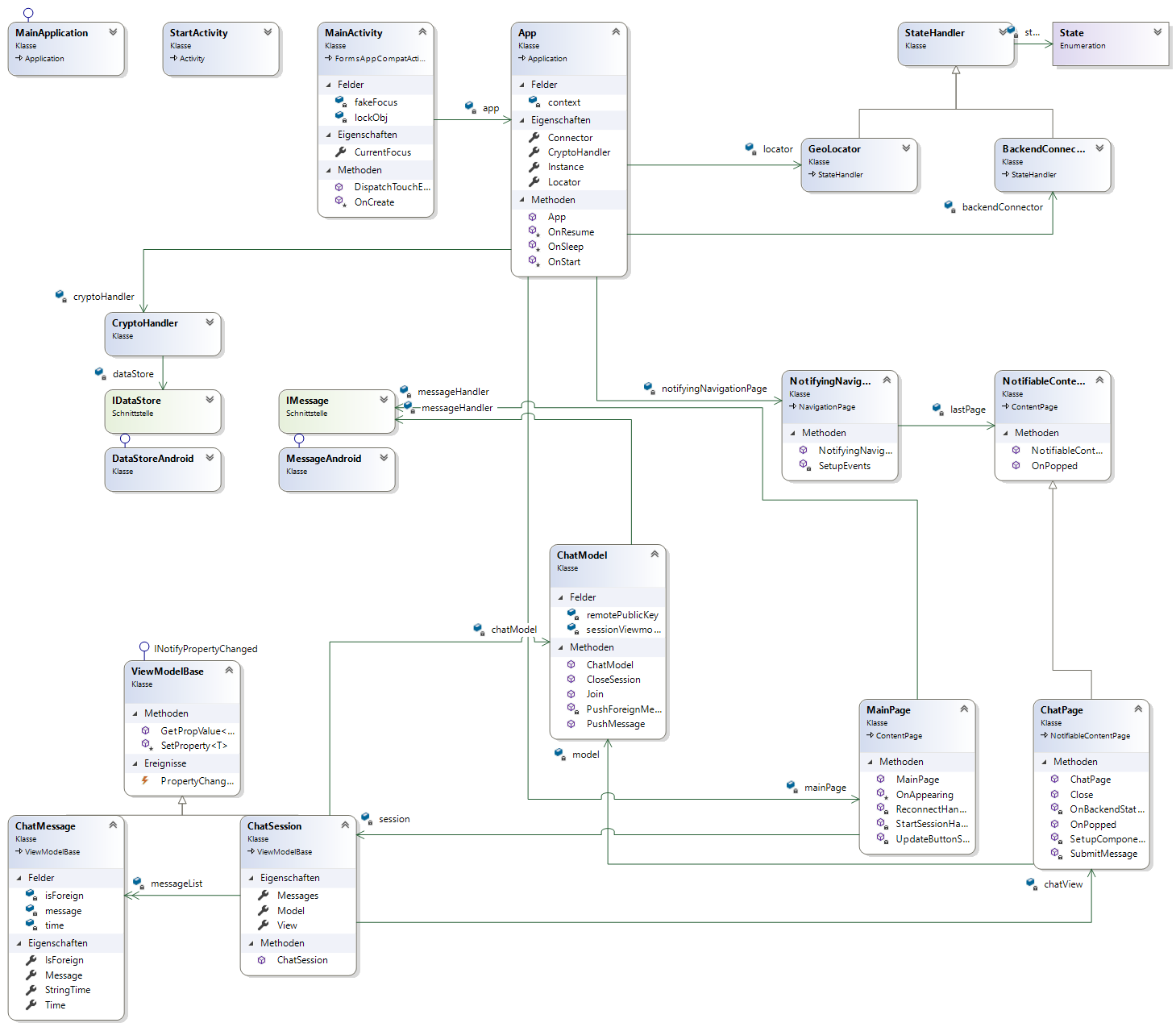
this week we created a first version of our class diagrams.
The class diagram uses Visual Studios class diagram creation tools. First we created the C# code and then generated a diagram. We used as mentioned the Visual Studio toolkit for generating it automatically.
These diagram is a first versions, we will adapt and improve it while working at our project, so it will change in time. You can inform about the progress at our Software Architecture Document which also describes our project more in detail.
We also added our class diagram to our Software Architecture Document.
Best Regards
The NeCo Team
 NeCo
NeCo 
Hey guys,
i just saw your new blog entry and wanna share some thoughts with you. Could you add a link to your diagram, or something? The picture is so small that it is impossible to read. I would like to see all the details soon and learn some more about your progress.
best regards
team dffc
LikeLike
Hi Team dffc,
thanks for your comment. We added a link to the picture, so now you can look into it in detail.
Best regards,
Team NeCo
LikeLike
Perfect,
This is much better….the diagram looks very good, all the details are in it and it is still readable!
Best regards
Dffc
LikeLike
Hey Team Neco,
your diagram looks very good and is well structured! I found it easy to read and it was also easy to understand how your app works. I think it is a good idea to link the use case specification, as you guys did. Good work!
Just a little mistake – there’s still one ‘diagramm’ in your post! 😉
Yours sincerely
Team react
LikeLike
We fixed it 🙂
Thank you
LikeLike
Hey Guys!
Your Class Diagram looks very good and well structured. You have a lot of classes already implemented what is very good.
Are you using a database? If yes you should add an database diagram. If not you could maybe mention that in your blog.
Best regards
Team
Mix-It!
LikeLike
We don’t have a database yet, so we didn’t add a diagram for it. However, we will do it as soon as we have one.
Thank you 🙂
LikeLike
Hi Team NeCo,
we like the first version of your class diagram, it is well organised and gives a good impression of your structure.
We would like to know if you are using a database or any other solution for the resulting data?
Best regards,
Team PPR
LikeLike
As already mentioned, we have no database yet.
Thank you 🙂
LikeLike
[…] 4: Use Cases 1 & 2 Week 5: Scrum & Prototype Week 6: Gherkin .feature files Week 7: Class Diagram Week 8: Architecture Week 9: Gantt […]
LikeLike