W9 – Final Exam

This week we have our final exam, therefore this is going to be our last post on this blog for this second semester.

So finaly we can take a short break and resume what we have done.

You can visit our whole documentation here.

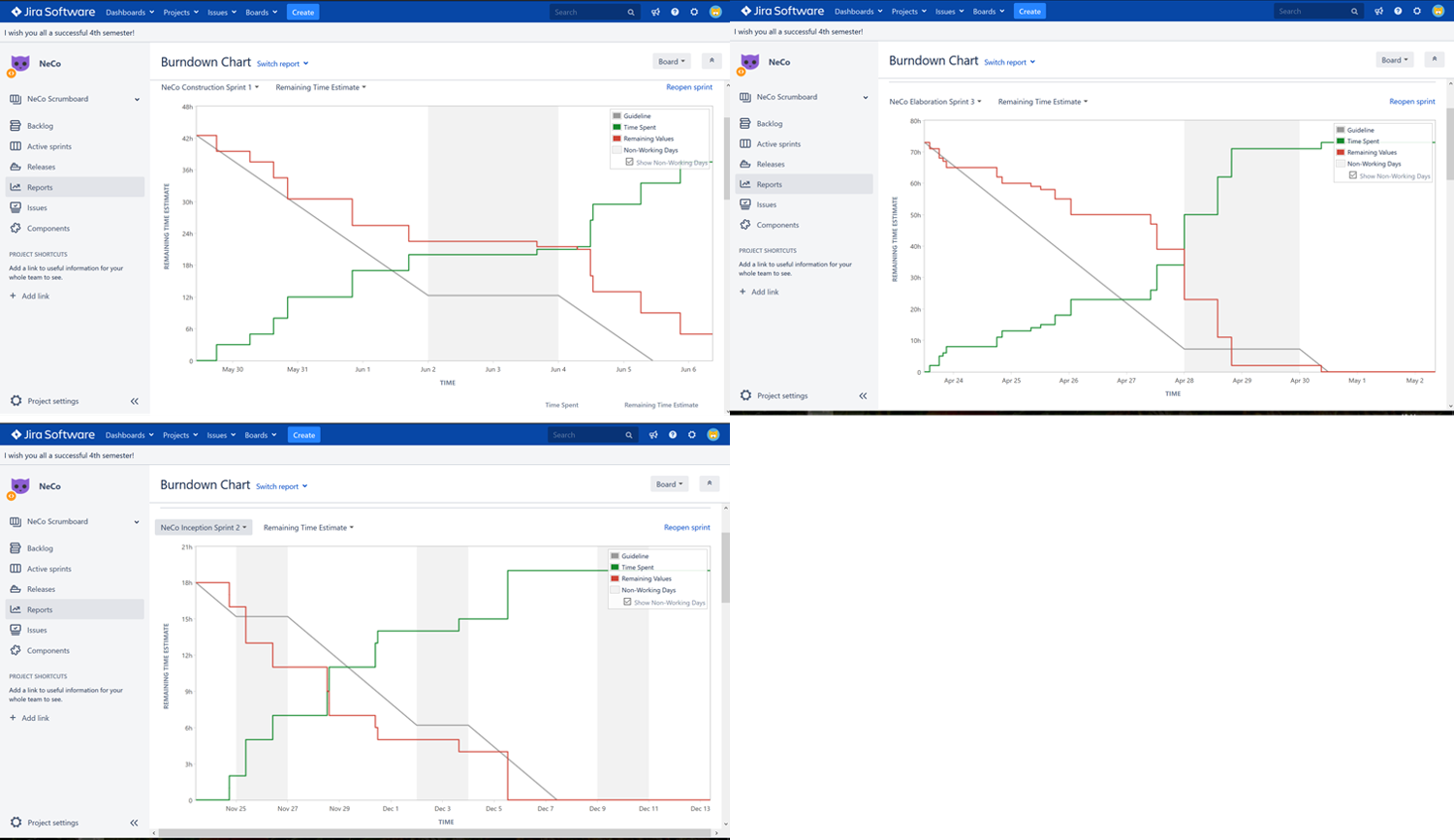
Furthermore we want to show three clean sprints, which we made this semester, using Jira.


Also you can find a video of using our app here.

Finaly you can find all contents of this project in a .zip-Folder here.


Kind regards,

Team NeCo

W9 – Final Exam

W8 – Installation Test

This week we published our app on the playstore. Therefore we needed a google developer account which we furtunately had. If you want to install it on your own Android device you can follow the link below.

On the playstore it is published to everyone and got already downloads. We also tested the successfull installation with some of our friends and family.

For a more detailed insight we propose you to take a short survey, which we made for us to know, how everything works and if there are any problems.

You can find the survey here, thanks for participating.

The results of the test can be inspected here.

Get it on Google Play

W8 – Installation Test

W7 – Metrics

Hi,

this weeke we looked closer at metrics. We used the metrics tool inside our IDE Visual Studio 17 and therefore got some detailed insights into our code.
Getting it to work for Xamarin took a bit of time and effort, due to the different architectures.

It calculates several metrics:

Those are the values before our code refactoring. Surprisingly, after having done the refactoring task, the metric values didn’t change notably. The overall cyclomatic complexity even increased. This shows that refactoring the code by extracting methods, simplifying expressions or preforming small optimizations doesn’t change the algorithm used, but only restructures it and makes it more readable to the user most of the times. Code metrics instead seem to analyze the algorithm itself neglecting (partly) how well structured the implementation is.

This actually turns the code metrics into a useful tool to get a feeling of how good the logic is, but doesn’t necessarily help to refactor small parts of the code.

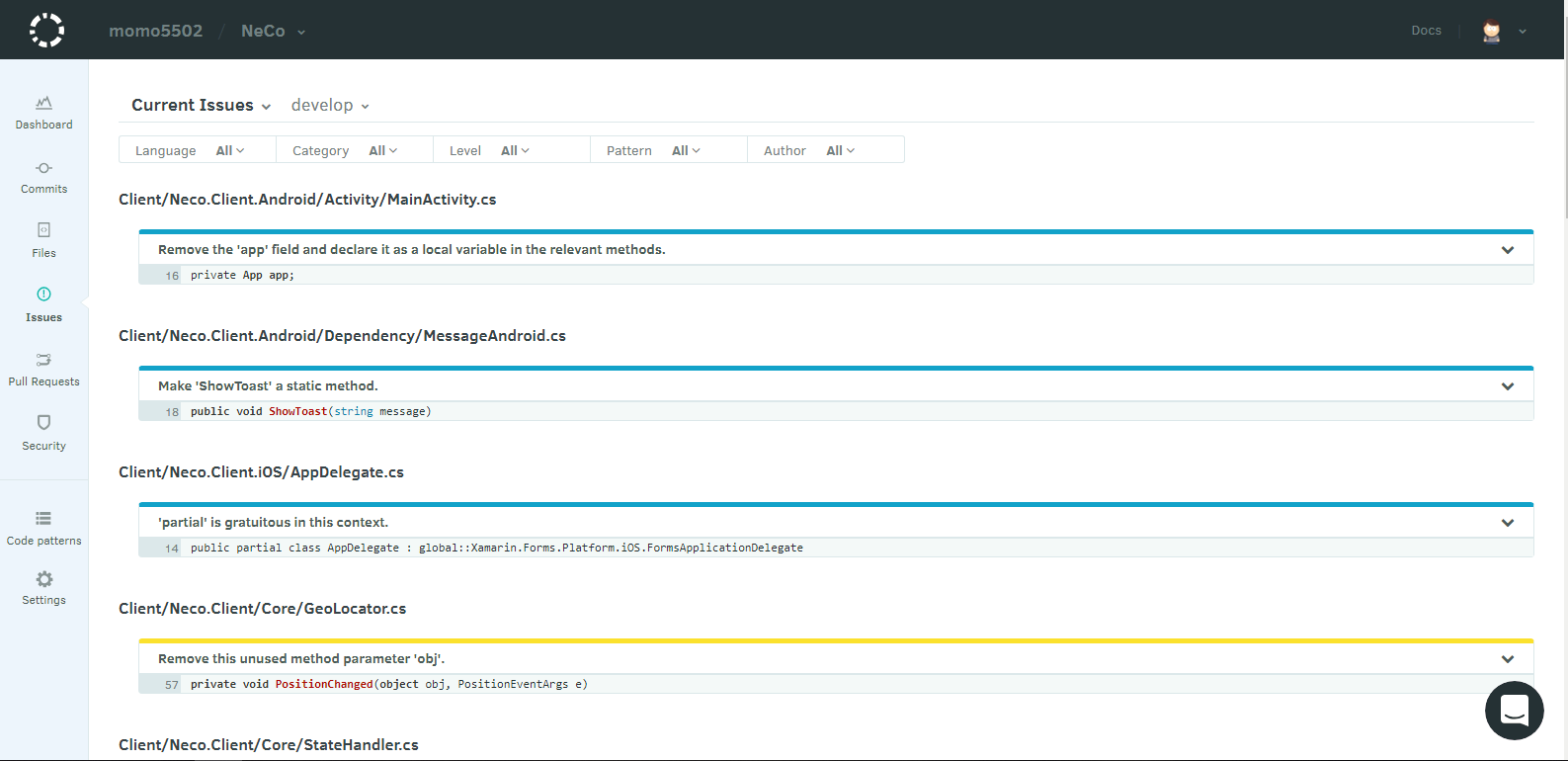
Additionally, we integrated codacy to our project which shows us additional issues and points of optimization:

codacy.png

Also here is a picture of our build-server running our tests:

buildserver

Finally we also added sonarqube to our project to track bugs/codesmells and coverage:

sonarqube

Kind regards,

Team Neco

W7 – Metrics

W6 – Design Pattern

Hi everyone,

this week we diged further into refactoring and implemented some design patterns.

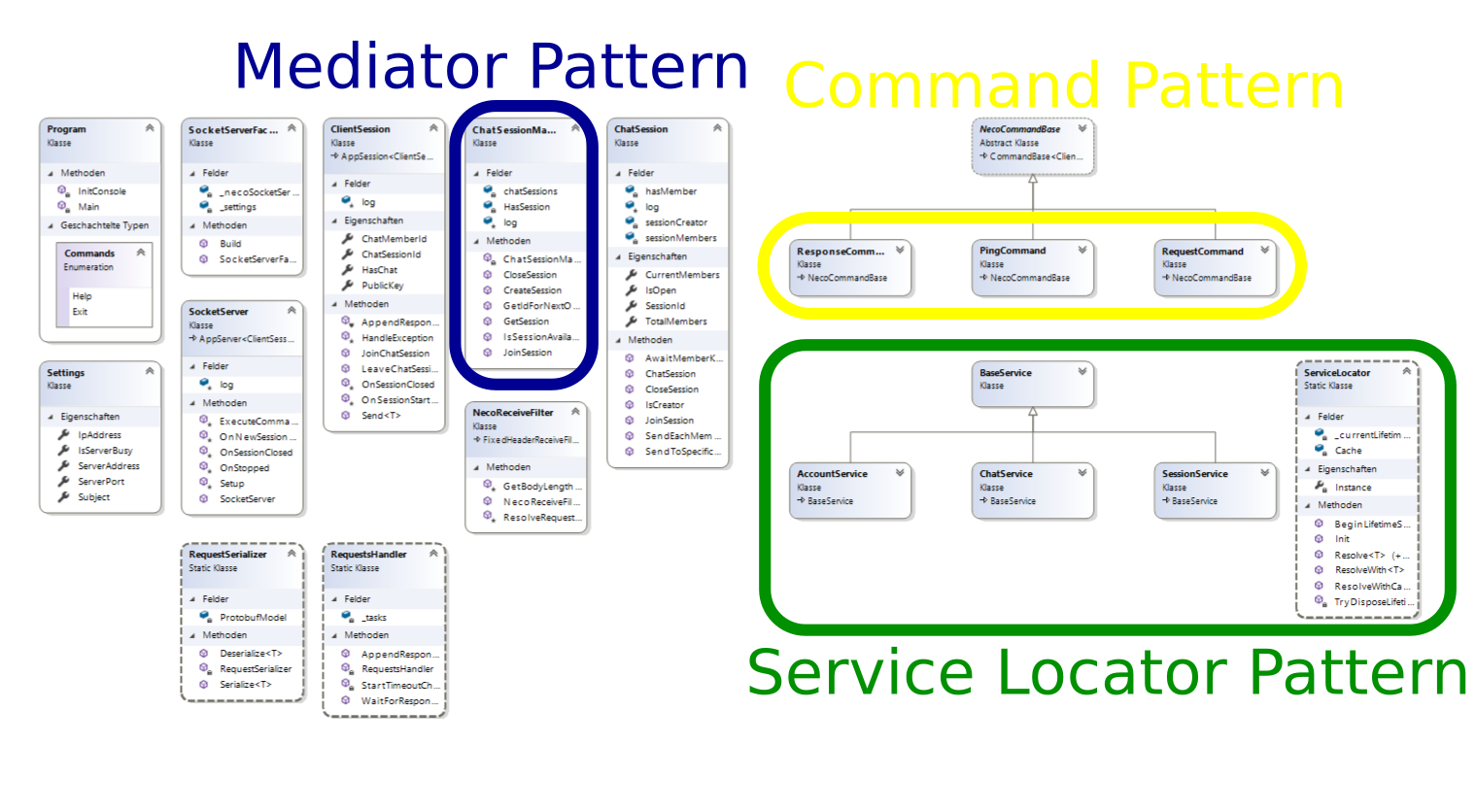
We’ve choosen a service locator pattern to be used on our server. This pattern is typical for c#.

Therefore we rebuild our InfrastructureInitializer to a SocketServerFactory.

As we already used some patterns since the beginning of development, we decided not to compromise the code integrity completely. Therefore not realy much changed in our code.

The picture above unfolds our pattern used.

The pictures below show our class diagramm before we implemented the pattern


Kind regards,

Team Neco

W6 – Design Pattern

W5 – Refactoring

This week we learned more about refactoring. We studied the introduction to refactoring from Fowler, you can learn about it here. For learning purposes each of us trained the idea of refactoring on some exercise project.

You can find each of our projects here on our team member’s GitHub Account.

Maurice’s GitHub

Mirko’s GitHub

Alex’ GitHub


In the screenshot below you can see, how Eclipse is helping us to refactor, first you can automatically move methods.


Furthermore Eclipse shows warnings like unused imports etc. while you code, so you might inspect these warnings early on.

Best Regards,

Team Neco

W5 – Refactoring

W4 – Unit Testing

Hi everyone,

this week, we created our test plan

this week’s topic was testing our project. So we started writing tests for our application improving our applications by finding bugs in early stage of development. Therefore we first wrote a Testplan which you can find here. It’s going to be completed with all information needed in the future, while we work more on testing our project.

We use the MSTest framework for C# and it has been added as dependency to our project here.

A link to our tests can be found here.

For your overview, in the screenshot below, you can see the tests running in our IDE.

We’re looking forward to your feedback

Best regards,

your Team Neco

W4 – Unit Testing

W3 – FUNCTION POINT ESTIMATION

Hello!

Today we want to show you our function point estimation.

First of all we will give you a little explanation about function points.

Function points are used for estimating the time that will be spent on a certain Use Case. They are calculated in reference on External Inputs, Outputs, Inquiries as well as Internal and External Logical Files from the User’s view, thereby they do not depend on the used technology.
To estimate how long it will take to implement a Use Case, function points of UC that have been already implemented are put in relation to the time we spent on it.
We used the calculation for our function points from „TINY TOOL„.

Now to the actual work we done.

The following table shows our completed Use Cases with the time we needed to implement. You can also see the at the beginning explained references we calculated the function points on.

The acronyms DET, RET and FTR mean Data Element Type, Record Element Type and File Type Reference. Through these we identified the complexity which can be low, average or complex.
Here you can find the whole document which also includes the data for the new Use Cases. In this document you also see the estimation for the new Use Cases these get explained later in this blog entry.

For the calculation of function points with TINY TOOL you need some extra information about the whole application.

In this screenshot you can see what we choose for our project.

We calculated the function points for all our Use Cases. For example in the next picture you can see the table for the Use Case „Relay Message“.

Domain Characteristic Table

This Use Case has 81,9 function points. Here you can see the whole document.


With the calculated function points we generated a diagram which shows the interact of the function points and the person hours.

FP calculation and time estimation diagram

We used this graph to estimate the time for our remaining Use Cases. In the graph you can see these as orange dots. You can only see four dots, because two Use Cases („encrypted chat“ and „visualize lobby“) have the same amount of function points. Below you can see our time estimation for our new use cases.


I hope you liked it and if you want give us some feedback.

Greetings,

NeCo

W3 – FUNCTION POINT ESTIMATION

W2 – Scope & Risk Management

Hi there,

this week, we digged further into project management, defining our scope more detailed and identifying risks of this project.


  • You can find our risk management table here.
  • We made a time estimation for our use cases done in the last semester, which you find here here.


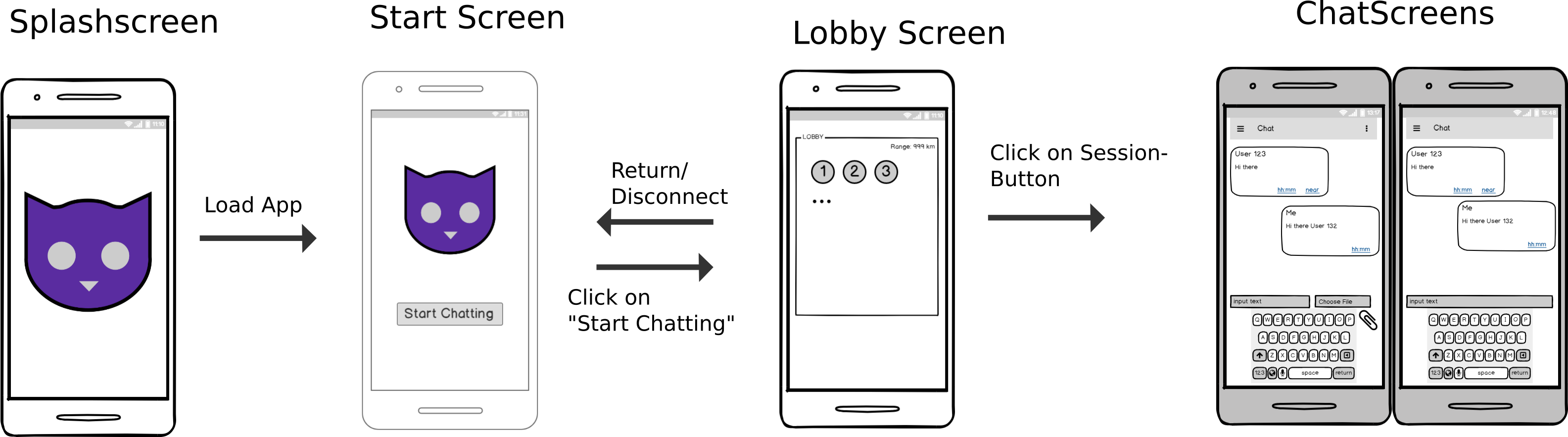
This is the screenflow of our application, showing the flow using our application:

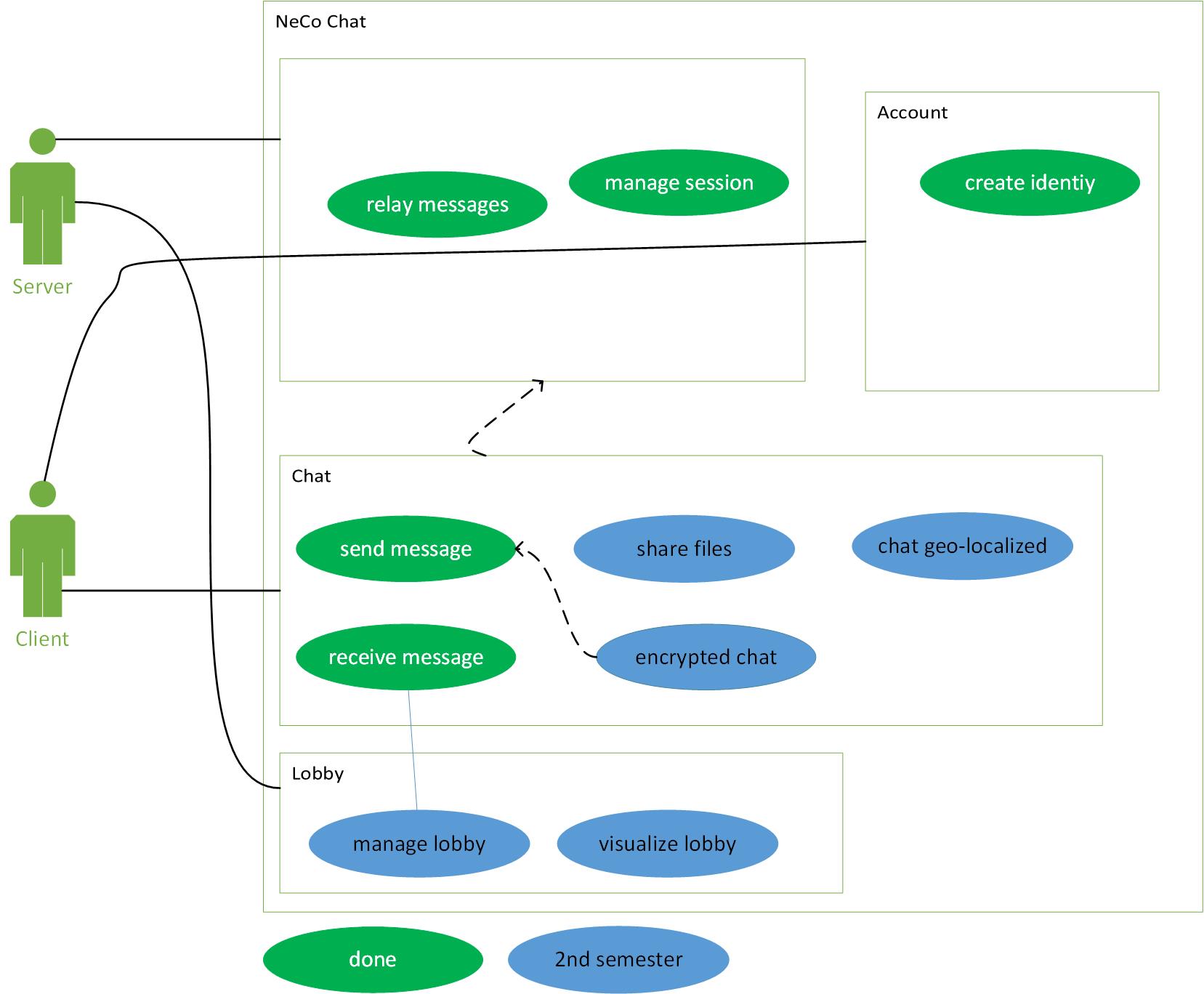
For an overall overview you can visit our first post of this semester, where you find our overall use case diagramm.

Best regards,
Team NeCo

W2 – Scope & Risk Management

2nd Semester – W1

Hi everyone,

for the first week of the new semester we revisited our code and documentation and set all up, to work further on our project.

We changed our scope to new requirements and updated our Overall Use Case Diagramm:

We still rely on our well know technologies.

You can see how many hours we spend on each use case and how many LOC are written per use case, in the following. All values are estimated, using our Jira issues and our GitHub commits:

  • Relay messages
    • 8h / 1 PD
    • 250 LOC
  • Manage session
    • 16h / 2 PD
    • 150 LOC
  • Create identity
    • 8h / 1 PD
    • 200 LOC
  • Send message
    • 16h / 2 PD
    • 1000 LOC
  • Receive message
    • 16h / 2 PD
    • 1000 LOC

Fortunately our team consists of the same team members as last semester 🙂


2nd Semester – W1

Midterm

Hey everyone,

this is the last post for this year. Here you can find our Software Requirement Specification and the Software Architecture Document.

Below you can see all the posts for each week:

Week 1: Vision
Week 2: Team Roles & Technologies
Week 3: SRS & OUCD
Week 4: Use Cases 1 & 2
Week 5: Scrum & Prototype
Week 6: Gherkin .feature files
Week 7: Class Diagram
Week 8: Architecture
Week 9: Gantt Chart

Here you can find a link to the midterm presentation.

Midterm