
Hi everyone,
today we launched our App prototype on the Play Store.
If you are interested you can get it here:

Kind regards,
The NeCo Team
Hi everyone,
today we launched our App prototype on the Play Store.
If you are interested you can get it here:
Kind regards,
The NeCo Team
Hi there,
this week we worked on our Gantt Chart showing all the work we have done so far. Because we are using Jira for issue tracking, we could export the task list as a comma-separated values (CSV) file quite intuitive. However, we failed at importing this file into MS Project, as it doesn’t recognizes the file’s format.
Furthermore we started working with Jira quite at the mid of our projects first part, therefore we had to add tasks, that we did before we used Jira.
The export of the Gantt Chart was also quite unhandy, because fitting it into an A4 PDF file was possible, but you need to zoom in realy deep. So if you have MS Project installed, it is better to take a look at our original MPP file, which you can download here.
Otherwise, you can find the PDF version here on our Github, preferably you download it to be able to zoom in properly.
For us a Gantt Chart isn’t quite good at telling us how long we spent on what task or phase. As we are not using any time tracking tool, therefore we depend on our Jira Sprints for time management. Logging work in Jira is for us a good overview of our workload. At the sprint overview you can also see how long you spent on an issue and what you were doing in the past, and are currently doing.
Best regards,
Team NeCo
Hi there,
Today we created the Software Architecture Document to give you an overview of our architecture model.
Here you can see our redrawed ClassDiagram where you can see which classes are the View, ViewModel, Model and X-Plattform/Core.

Best Regards
The NeCo Team
Hi everyone,
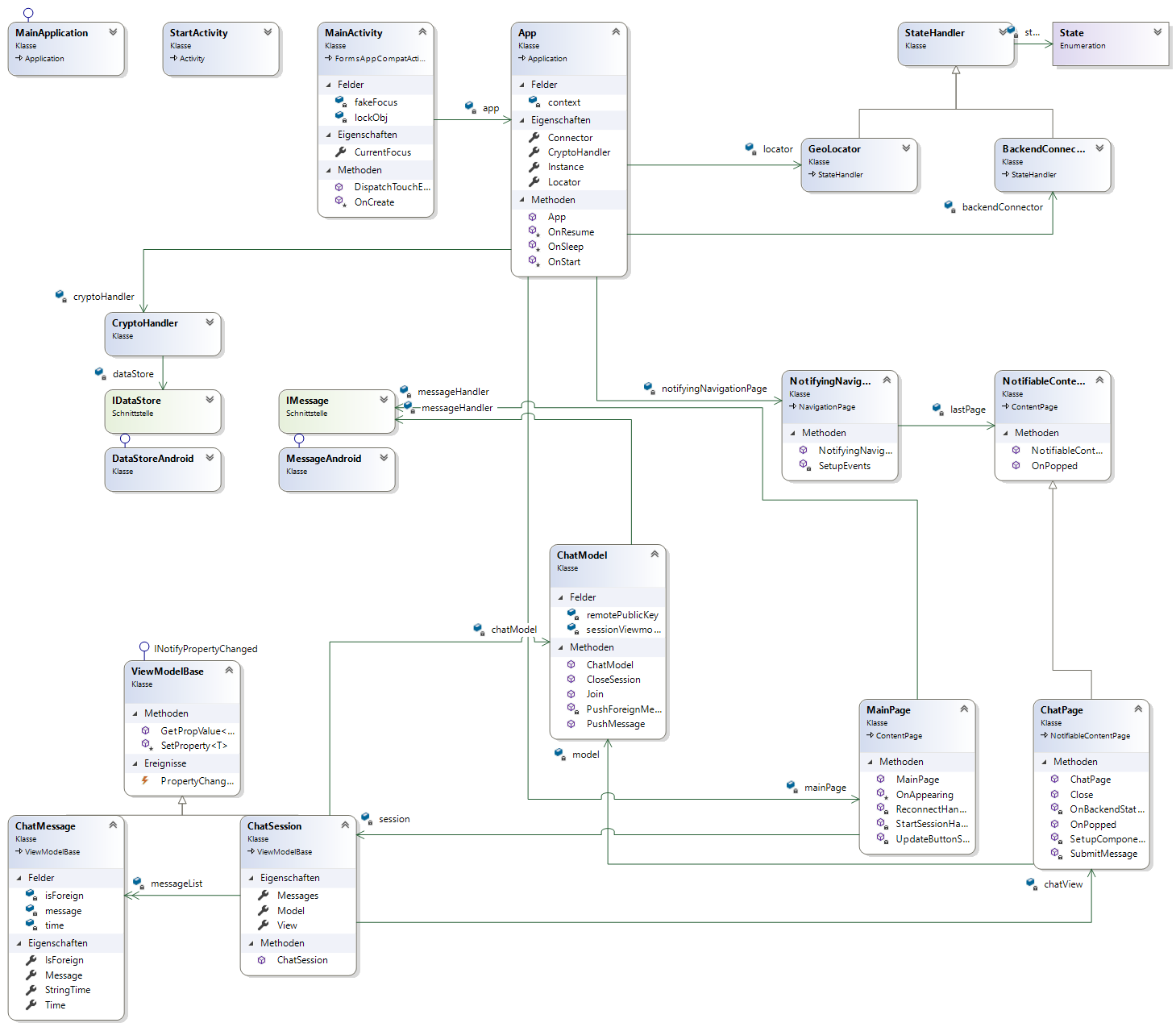
this week we created a first version of our class diagrams.
The class diagram uses Visual Studios class diagram creation tools. First we created the C# code and then generated a diagram. We used as mentioned the Visual Studio toolkit for generating it automatically.
These diagram is a first versions, we will adapt and improve it while working at our project, so it will change in time. You can inform about the progress at our Software Architecture Document which also describes our project more in detail.
We also added our class diagram to our Software Architecture Document.
Best Regards
The NeCo Team
Hi there,
this week we advanced a step further into Behavior Driven Development, therefore we wrote .feature files for some of our Use Cases.
You can find those files right here:
Furthermore we added these feature files in our Use Case Specifications.
For a better syntax highlighting in Visual Studio we used the plugin “SpecFlow VsIntegration”. The screenshot below shows additionaly the autocompletion.

This week we dealt with project management tools and scrumming.
For our project, we decided to use the tool Jira from Atlassian.
We’ve also created our first sprint , which you can see on our Jira scrumboard or on the screenshot below. Here you can see the actual status of our sprint.

The contains 5 basic tasks, assigned to a member of our team for processing.
Therefore we also defined our sprint length to 2 weeks.
We’ve also uploaded our first prototype of the NeCo App this week. You may look into it on our GitHub repository. The screenshot might give you a feeling, of how the app will look like.

You can find our prototype here
And our Scrumboard here
If you have any ideas or thougts on our process on the project, feel free to comment here.
This week we started creating and specifing 2 Usecases. We also setup the first hello world page on our client and server. You can find the latest version on Github.
UC1: Send Message
https://github.com/Haus4/NeCo/blob/master/docs/UC1_SendMessage.md

UC2: Receive Message
https://github.com/Haus4/NeCo/blob/master/docs/UC2_ReceiveMessage.md

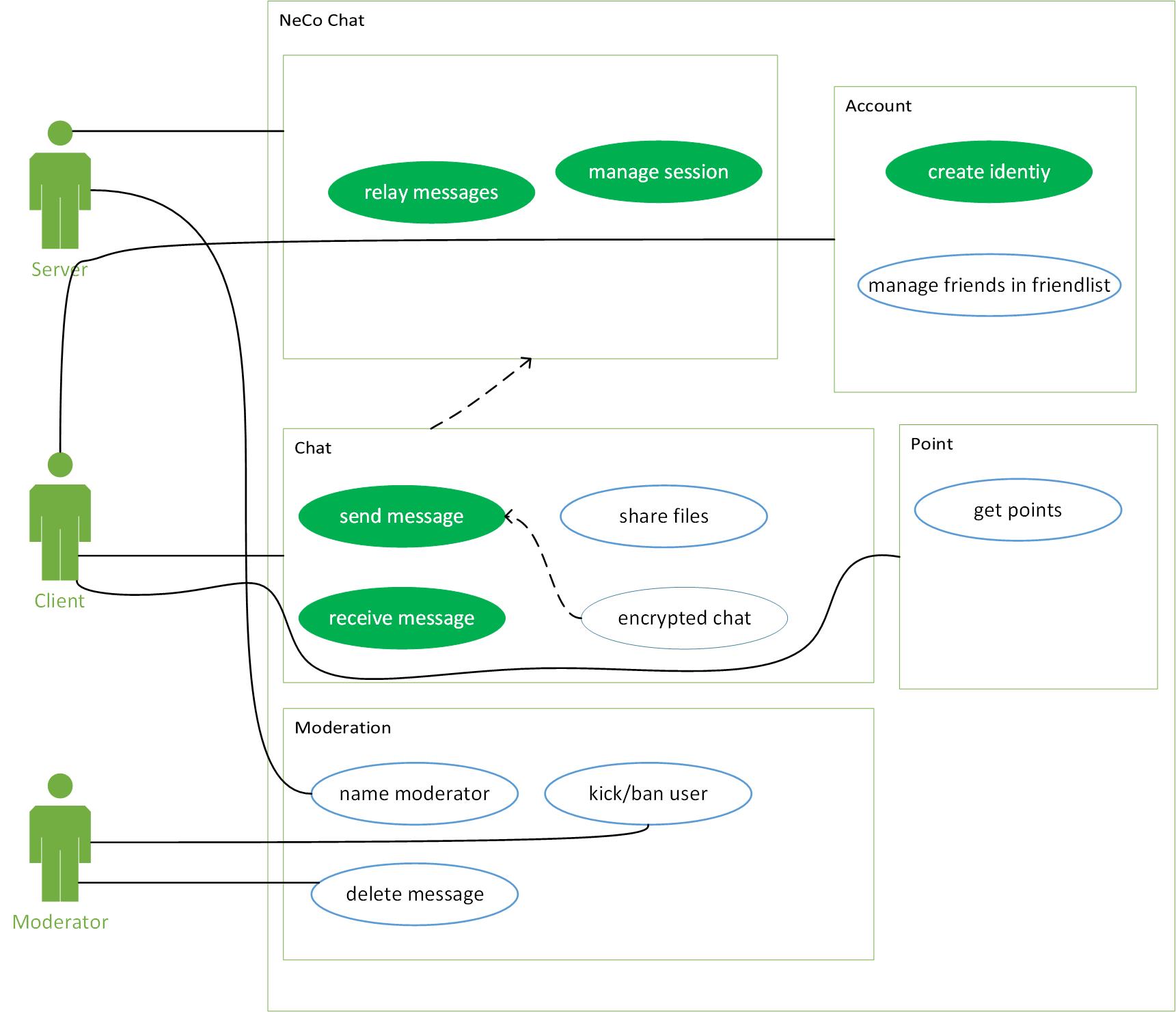
This week we started planing our Software Requirement Specification and our Overall Use Case Diagramm in detail. You can find the latest version on Github.
SRS:
https://github.com/Haus4/NeCo/blob/master/docs/SRS.md
OUCD:
https://github.com/Haus4/NeCo/blob/master/docs/UseCaseDiagramm.jpg
Here are our Team Roles defined, according to the RUP Model.
Each role comes with certain responsibilities.
Front-End-Developer: Maurice Heumann
Server-Administrator: Mirko Müller
Project Manager: Alexander Rengers
Business Process Analyst: Alexander Rengers
Software Architect: Mirko Müller
Test Manager: Mirko Müller
Responsible for Blog posts: Alexander Rengers
Our App is going to be a Xamarin App, developed using C#. Therefore we use the Visual Studio IDE for development and, Git for version control.
For continous integration we use Jenkins CI.
For UI-Tests we use the SpecFlow plugin vor VS.
For project management we’re going to use Jira.
We are a group of three students studying B. Sc. Computer Science at the DHBW Karlsruhe. During our lecture of Software Engineering we have to implement a program. On this website we will inform you about the progress of our project.
Our idea is to develop a Xamarin App for chatting with strangers around you.
The basic idea behind NeCo is to use localization technologies to create chatrooms with people around you, similar to the popular app “Jodel”. The difference is that you chat with random people in your local area, to meet, to party, or just to have fun.
For security reasons we’ll use latest encrypting technology like RSA&AES-Encrypting.
Ideas for future features could be:
We will publish parts of our source code here and hope to get your comments to help us create our app the best way possible.
Thank you for reading our blog!
 NeCo
NeCo 
